

Indian Pottery

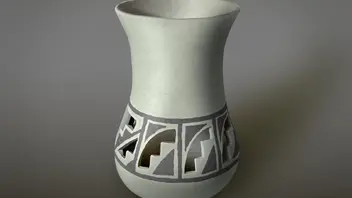
  • This is a vector illustration of a piece of Indian-inspired Pottery, which my brother made for me years ago. He dug the clay, made the cutouts, painted it with slip and fired it in his backyard. He's quite a craftsman and naturalist and made his own tools from naturally available materials as the North American Indians did 500 years ago. He's made birch bark canoes, deerskin clothing, reed boats, bows & arrows, and dozens of other things in a similar manner. Hope you like the illustration and his original design.
    2024 MacBook Pro M4 Max, 48GB, 1TB SSD, Tahoe O/S 26, Affinity v1, v2 & v3, Adobe CS6 Extended, LightRoom v6, Blender, InkScape, Dell 30" Monitor, Canon PRO-100 Printer, i1 Spectrophotometer, i1Publish, XenceLabs Medium Pen tablet, 2TB OWC SSD USB external hard drive, Logitech MX Anywhere 3 bluetooth mouse.

    Edited once, last by ldina (June 17, 2026 at 2:04 AM).

  • That's a photo-realistic image you drew!

    Thank you. Affinity has so many great tools to create photo realistic illustrations. FX (3D, Bevel/Emboss, Inner and outer glow, blurs, etc) come in very handy and so do Procedural Textures, Gradients and Live Filters. Many of the filters result in rasterization, but I usually export to JPG or PNG anyway. There are also Pixel based brushes and tools, which are very flexible. I don't think I used any for this image, but I often do use some, where needed.

    2024 MacBook Pro M4 Max, 48GB, 1TB SSD, Tahoe O/S 26, Affinity v1, v2 & v3, Adobe CS6 Extended, LightRoom v6, Blender, InkScape, Dell 30" Monitor, Canon PRO-100 Printer, i1 Spectrophotometer, i1Publish, XenceLabs Medium Pen tablet, 2TB OWC SSD USB external hard drive, Logitech MX Anywhere 3 bluetooth mouse.

    Edited once, last by ldina (June 17, 2026 at 2:05 AM).

  • It's clear to see that you're a happy camper with Affinity!

    Yes, mostly because of the type of work I do now, largely photography, HDR, focus merging, compositing, illustrations, some Layout work, etc., and mostly for my own enjoyment. Affinity does pretty much everything I want to do, and I prefer the interface and interchangeability over the "Big A". I like Affinity v3 and the ability to have pixel, vector and layout tools available seamlessly.

    I'm retired now and no longer send jobs to Press, work with agencies, clients, etc. There are some features and abilities that Affinity still lacks, many or most of which can be worked around. There are still some shortcomings for Press work, unwanted rasterization of vectors, overprint preview, inability to assign different color profiles and rendering intents on an image by image basis, etc. And many of Affinity's "vector tools" are pixel based, such as Path Brushes, which rely on PNG images. The PDF-Lib module Affinity uses imposes some irritating limitations on importing and exporting of PDF files. Exchanging working documents with other agency professionals can also be an issue, but for a small agency or a one-person shop, Affinity can work fine with adequate knowledge and experience.

    It appears development has sped up somewhat since Canva bought Serif, which I am very glad to see. New capabilities are being added and bugs are beginning to be addressed more rapidly. So things are getting better from my perspective.

    So yes, for me Affinity works great and I am very happy with it. If I were still a marketing and advertising manager doing regular Press and Advertising work, I'd have to give it more thought, depending on how and with whom I worked.

    2024 MacBook Pro M4 Max, 48GB, 1TB SSD, Tahoe O/S 26, Affinity v1, v2 & v3, Adobe CS6 Extended, LightRoom v6, Blender, InkScape, Dell 30" Monitor, Canon PRO-100 Printer, i1 Spectrophotometer, i1Publish, XenceLabs Medium Pen tablet, 2TB OWC SSD USB external hard drive, Logitech MX Anywhere 3 bluetooth mouse.

    Edited 3 times, last by ldina (June 17, 2026 at 2:34 AM).

Participate now!

Don’t have an account yet? Register yourself now and be a part of our community!