


Creative use of masks

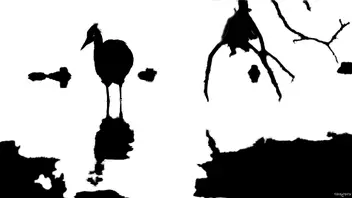
  • Ich habe heute durch Zufall eine interessante creative Verwendung von Masken entdeckt. Man kann ja Masken in SW-Ebenen umwandeln in Kanäle-Menue, das habe ich genutzt um eine Art Tuschezeichnung zu erstellen.

    From DeepL: I stumbled upon an interesting creative use for masks today. You can convert masks into SW layers via the Channels menu, and I used that to create a sort of ink drawing.

  • In version 2 of Affinity Photo we could isolate Spare Channels (see just the greyscale image that is one channel) and edit them then use the edited versions as masks or for selections. It was great. Since the introduction of Affinity (by Canva) we can still edit them but not without seeing the full colour of the document. I really miss being able to see what is happening to the spare channel.

    I have reported this as a bug but there has been no attempt to get back to the very useful method available in version 2 of Affinity Photo.

    Mac Pro (Late 2013) Mac OS 12.7.6
    Affinity 3.0.1 | Affinity Designer 2.6.5 | Affinity Photo 2.6.5
    Affinity Publisher 2.6.5 | beta versions as they appear.

    I have never mastered color management, period, so I cannot help with that.

  • One of the new features of Affinity V3 is the ability to convert pixel selections to shapes (via the Vector menu Convert to Curves item).You can then use Rasterize to Mask from tghe Pixel meu (or via a right-click on the curve in the lLayers panel.

    This can create interesting effects otherwise hard to do....

    V1, V2, & V3 Mac Affinity apps; 2020 iMac 27"; 3.8GHz i7, Radeon Pro 5700, 32GB RAM; macOS Catalina
    All V2 apps for iPad; 6th Generation iPad 32 GB; Apple Pencil; iPadOS 15.7

Participate now!

Don’t have an account yet? Register yourself now and be a part of our community!