Crashing on Windows 11

  • Firstly may I apologise if I'm doing this wrong, I'm a newbie to writing on a forum. I have been having issues with the new Affinity for photo processing and haven't been able to come up with a solution so am wondering if anyone here might be able to give any advise.

    When going from a RAW file after pressing develop it will often crash, not every time but quite regularly. It especially does it if I go too quickly to do something once it has developed. It will also crash at other times and am finding this is quite often if I move too quickly. My system is an Acer laptop on windows 11 with 954 GB and only 474 used; 128 Graphics card; 16GB Installed RAM and 11th Gen Intel(R) Core(TM) i7-1165G7 @ 2.80GHz.

    I've had others tell me to clear temp files which I've done, and have also run a mem test check which came up with everything ok.

    V2 ran perfectly so am wondering if I need to upgrade to a better laptop (don't really want to unless absolutely necessary though).

    Any advise welcome and thanks in advance.
  • Welcome, Aileen! I love your penguins avatar.

    Core i7 processors (especially 11th Gen) are pretty beefy, so your system spec sounds more than reasonable unless you’re working with large multilayer documents with adjustments and live filters that gobble up memory.

    What type of raw files (ARW, CR3, DNG, NEF, etc) are you trying to process, and what are their pixel dimensions?

    Affinity Designer/Photo/Publisher 2 for Windows • Windows 10 Home/Pro
    Affinity Designer/Photo/Publisher 2 for iPad • iPadOS 17.5.1 (iPad 7th gen)
    Affinity Studio (version 3) on Windows

  • Thanks Alfred,

    Penguins were from a recent trip to Antarctica - an amazing experience.

    Photos are CR3 6022x4024px and usually around 24mp. From a Canon r6 ii. Usually single shots, I do occasionally do multiple exposure and composites etc but it's crashing just on single photos and when you have a couple thousand to process it's rather frustrating.

  • Penguins were from a recent trip to Antarctica - an amazing experience.

    I’m sure it was! I’ve only ever seen penguins in captivity, mostly at Edinburgh Zoo many years ago.

    I imagine you saw quite a variety of species on your trip, not just the Adélie penguins that most people automatically think of.

    Photos are CR3 6022x4024px and usually around 24mp. From a Canon r6 ii. Usually single shots, I do occasionally do multiple exposure and composites etc but it's crashing just on single photos and when you have a couple thousand to process it's rather frustrating.

    Thanks, Aileen. The app shouldn’t crash at all, of course, but I can particularly understand your frustration at its crashing on single photos. I’ll leave it to the Canon/raw experts around here to come up with constructive suggestions about how to move forward.

    Affinity Designer/Photo/Publisher 2 for Windows • Windows 10 Home/Pro
    Affinity Designer/Photo/Publisher 2 for iPad • iPadOS 17.5.1 (iPad 7th gen)
    Affinity Studio (version 3) on Windows

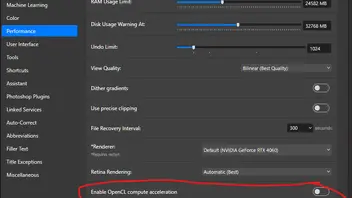
  • Have you tried turning off the "Enable OpenCL compute Acceleration" in Edit -> Settings - > Performance? I find this helps reduce the number of crashes with Affinity. Nothing will make it crash proof, so save frequently.


    You will need to restart Affinity for this to take effect.


    S.

    Photo hobbyist and publishing dabbler.

    “The creation of something new is not accomplished by the intellect but by the play instinct.” ~ Carl Jung

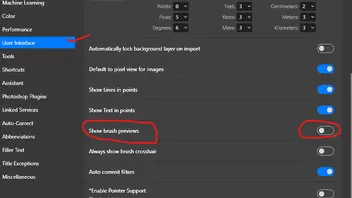
  • Something I ran across that helped me in random crashing on windows was turning the brush preview setting off, maybe worth a try?

    I do not know this to be true (not an adobe user) but the post said adobe had abandoned this feature.

    Bill - Windows 11PC user of Affinity V1 then V2 now V3

  • Could you provide such a RAW file so that we can check whether it behaves the same way here in Affinity? Unfortunately, files that large cannot be uploaded here, but there are other options, for example using a file sharing service such as Swiss Tante Emma

    Thanks for suggestion, I have currently turned off brush preview as suggested by Afbill and so far having success so am hopeful this has solved the issue finally.

  • So fingers crossed this will continue.

    I do hope it continues to help, I'm not a programmer but I assume this helps with "load" on the computer resources. I use brushes all the time and don't miss the preview "feature".

    A big thank you for posting back your results (good or bad)!! All the best, fingers crossed:thumbup:

    Bill - Windows 11PC user of Affinity V1 then V2 now V3

  • Thanks for suggestion, I have currently turned off brush preview as suggested by Afbill and so far having success so am hopeful this has solved the issue finally.

    Since this seems to prevent/reduce crashing on both your & Afbill's Windows systems, I think it would be a good idea for both of you to use the in-app bug reporting option to let the developers know about it. (You can access that from the Ask panel or via the Help menu >Send Feedback... menu choice.)

    You won't get an acknowledgement but if they know about it they can at least put it on their list of potential bugs to fix.

    V1, V2, & V3 Mac Affinity apps; 2020 iMac 27"; 3.8GHz i7, Radeon Pro 5700, 32GB RAM; macOS Catalina
    All V2 apps for iPad; 6th Generation iPad 32 GB; Apple Pencil; iPadOS 15.7

Participate now!

Don’t have an account yet? Register yourself now and be a part of our community!