Smoothing lines in Pixel

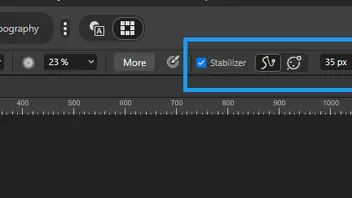
  • Hello. I'm new to using Affinity, is there a way to smooth lines when drawing using a paint brush or pencil in Pixel? I know that in vector that the line is smoothed, just wondering if something similar exists in Pixel. I have hemiplegic migraine that affects my right side and I'm right handed and am somewhat wobbly with my lines due to loosing full ability after an attack.

    If Vector is the option - do the files get really big as it records each line as its own shape?

    Thanks for any advice on this issue. I have tried to google for an answer, but not a lot of current info pertaining to the new release. Glad to have found Creofora <3

    Edited once, last by mooksii (January 12, 2026 at 1:10 AM).

  • In general Vector based files will be smaller than Pixel based files.

    I am going to assume you want to avoid the jagged stair step effect/result of pixel based lines. if you use Vectors and view in Vector Mode they will be smooth. If you use Vectors and view in Pixel mode they will appear jagged, but they will be smooth. It is just a viewing choice that is making the Vectors look like Pixels. The key is whether or not you will export to a Pixel format like JPEG or PNG or TIFF, those will result in the smooth Vector lines being rasterized into Pixels.

    Mac Pro (Late 2013) Mac OS 12.7.6
    Affinity 3.0.1 | Affinity Designer 2.6.5 | Affinity Photo 2.6.5
    Affinity Publisher 2.6.5 | beta versions as they appear.

    I have never mastered color management, period, so I cannot help with that.

  • Hi Old Bruce, Thanks for the fast reply. I'm creating surface pattern design graphics for Creative Market. I thought Vector/SVG files would be the go to, but a deep dive revealed creators on CM providing 300dpi png, tiff, jpg: so vector files may not be important as I thought. My designs have hand painted watercolour and acrylic paint elements, so achieving a nice image after image trace can be difficult (Adobe Illustrator) giving best results as this stage due to the high fidelity photo option they have. It's looking like I can avoid going the svg step and stay in Affinity if png, tiff and jpg are acceptable files in CM. I've been out of designing for a few years due to above mentioned illness and the design landscape seems to have changed with svg files not being offered with every single graphic. Would love to stay in Canva and Affinity without needing to use a different platform.

    Edit: I tried some drawing in Canva using the pen tool and it uses a smoothing action. It wasn't so much the zoomed in jagged pixel issue, more that my actual drawn line is rough because my hand shakes. The info you have given is appreciated as I thought a vector file would be bigger than pixel.

    Edited 2 times, last by mooksii (January 12, 2026 at 5:45 AM).

  • This threads contains 9 more posts that have been hidden for guests.

Participate now!

Don’t have an account yet? Register yourself now and be a part of our community!