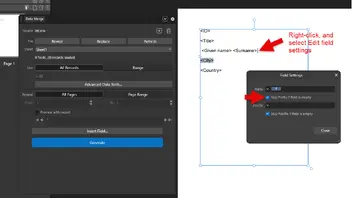
Affinity just outdid InDesign — Data Merge now with filters!

  • Guys, this is crazy — Affinity can now apply adjustments and filters directly to the data source during a Data Merge. Adobe InDesign still doesn’t support that, even after all these years.

    And the best part? Affinity offers it for free. You can filter datasets for different audiences or tweak them on the fly, which makes working with variable data so much smoother — especially for things like mailings, catalogs, or event materials.
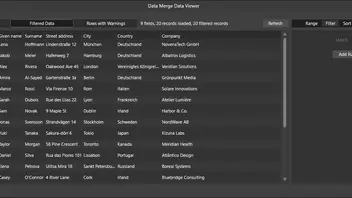

  • Filter is okay but the real neat thing is the Process tab on the left. I can set up a mailing list with

    Name
    Address 1
    Address 2
    City

    where Address 1 or Address 2 is blank and I will have

    Name
    Address 2
    City

    instead of

    Name
    <blank line>
    Address 2
    City

    Mac Pro (Late 2013) Mac OS 12.7.6
    Affinity 3.0.1 | Affinity Designer 2.6.5 | Affinity Photo 2.6.5
    Affinity Publisher 2.6.5 | beta versions as they appear.

    I have never mastered color management, period, so I cannot help with that.

  • Where does the data come from? a file? I need to learn this asap.

    PS Apple's Pages app has had mail merge... and for a long time.... although they had a gap for a few years.

    Affinity Suite V2.6.5. | Affinity Studio (3.0) | MacOS Sonoma | iMac 27'' | YVR | amateur |

  • Where does the data come from? a file? I need to learn this asap.

    I start with a Spreadsheet and then export that to a .CSV file. The Column head is the individual record names the Rows are the individual addresses or items for sale with product name, store name, and prices or whatever it is you are needing.

    I have some spreadsheets that are of my raw files. So there is a column with the entire raw file path, a column with just the name of the file and some columns with descriptions and notes.

    Mac Pro (Late 2013) Mac OS 12.7.6
    Affinity 3.0.1 | Affinity Designer 2.6.5 | Affinity Photo 2.6.5
    Affinity Publisher 2.6.5 | beta versions as they appear.

    I have never mastered color management, period, so I cannot help with that.

  • Where does the data come from?

    bici these are the supported files for your merge:

    • Text files (TXT, CSV, TSV)
    • JSON files
    • XLSX spreadsheets
    • These may come from tools such as Microsoft Excel, Apple Numbers, LibreOffice, and so on.

    Image links in data records

    • Records may include links to image files. These links are read directly from the data source during the merge.
    • In Affinity, these links can be assigned to picture frames.
    • During the merge, the linked images are placed into the picture frames in sequence, for example for profile or product photos.

    Path requirements for image links

    • Resource paths may be absolute or relative to the location of the data source or the saved document.

    Examples
    macOS: /Users/username/Desktop/ProjectImages/dummy-image.jpg
    Windows: C:\Users\username\Desktop\ProjectImages\dummy-image.jpg


    You can obtain example data from the Fake Name Generator at

    https://www.fakenamegenerator.com/order.php

  • Filter is okay but the real neat thing is the Process tab on the left

    Even more exciting could be the Script tab to the right.

    There seems to be a complete integrated script editor with syntax check. I don’t have any capabilities in that matter but tried to type something in the provided sample script and some syntax warnings appeared directly in the window as an exclamation mark…

    A direct validation and/or modification of the data source via JavaScript seems to be possible. 8)

    So scripting has been (partially) integrated already (as Serif was working on that for some time and many users had hope that it would appear in version 2).

    It remains exciting what is next to come…

    Affinity v1, 2, 2 Beta and 3 in a Windows 10 VM (4 CPU cores, 8 GiB RAM)

Participate now!

Don’t have an account yet? Register yourself now and be a part of our community!